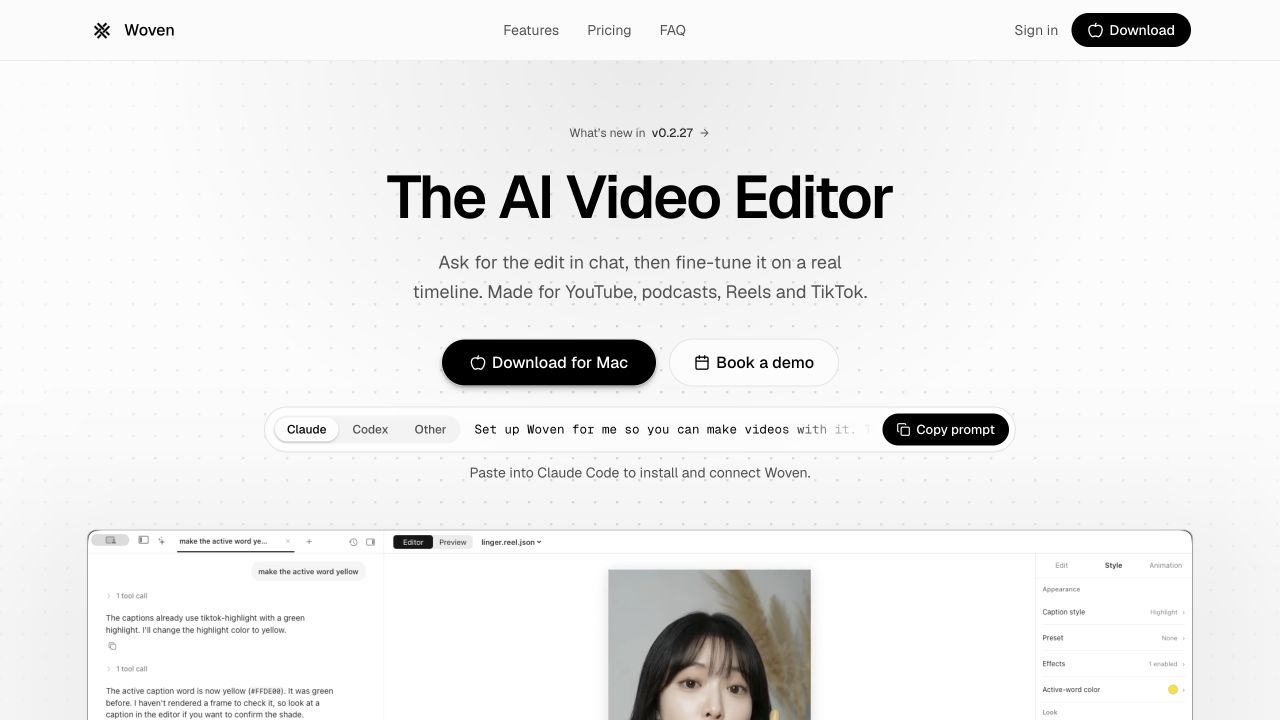
Woven Video is a Mac video editor with conversational editing and a timeline you can adjust directly. Its subscription includes a limited hosted-AI credit allowance; it does not make every generated asset or caption job unlimited.
Woven Video addresses a practical problem in conversational editing: you can ask for an edit, but you still need to see and correct what happened. Its official site presents chat commands alongside an editable Mac timeline. That makes the product relevant to creators who want help with routine changes while retaining direct control over the cut. [1]
This is a documentation-based review, not a timed editing test. The official changelog includes version 0.2.27 dated 23 October 2026, with several nearby releases. That is evidence of recent updates, not proof that the product first launched that week. [5]
Why the timeline matters
The appeal is being able to move between describing a change and adjusting the project yourself. A request such as tightening an introduction still leaves editorial decisions: which sentence carries the point, whether a pause builds emphasis and where a visual change becomes distracting. A timeline gives those decisions a visible place to live. [1][6]
For a creator editing a tutorial, a sensible trial is one short sequence with a talking head, a screen recording and a caption correction. Ask for a change, inspect the affected range and make a manual correction. The question is whether the combined workflow reduces work without making the project harder to understand.
Do not judge the editor only by the first successful instruction. Try a second instruction that changes the same region. Check whether timing, audio and captions remain aligned. This is a proposed evaluation workflow; we have not executed it or measured Woven against another editor.
Woven Video pricing: subscription versus usage
The official pricing page lists US$39 on monthly billing or US$299 for a year. The annual total is the commitment; a rounded monthly equivalent is not a month-to-month offer. The subscription includes US$10 of AI credits per month. Additional credit top-ups start at US$5. [2]
The terms distinguish credit balances. Included monthly credits reset without rolling over. Trial and purchased top-up credits do not expire under the inspected terms. Hosted models and other paid features, including automatic captions, draw from credits at the published rates. Check the current rate before starting a large job. [3]
That means a creator should budget for both access to the editor and the processing they expect to request. A project with repeated generation attempts can have a different cost from one that mostly uses existing footage and manual edits. We have not measured the credit cost of a representative finished video, so no cost-per-Short claim is justified here.
Using a separate provider key can also mean separate provider charges. Do not assume a subscription to another AI app automatically covers that provider's developer API. Review the configuration you actually select before enabling a paid processing route. [2][3]
The three-day trial requires a card
Woven's three-day trial requires payment-card details and turns into a subscription unless cancelled. The inspected pricing includes US$5 of trial AI credits. This is a time-limited trial, not a permanent free editing plan. [2][3]
Prepare your sample and a list of essential checks before starting. A useful trial ends with an exported file you have watched from beginning to end. Confirm the formats, frame rate, resolution and audio behavior your own delivery needs rather than inferring them from a polished marketing preview.
Mac requirements and cloud processing
The official guide specifies macOS 15 or later. This review does not establish compatibility with every Mac configuration, and there is no verified Windows version in the sources we inspected. If your team works across operating systems, treat that as an early selection question. [6]
Woven's privacy policy discusses hosted AI processing and service providers for accounts, payments and relevant features. A native application therefore should not be described as an entirely offline AI editor. The policy also distinguishes optional error reporting from ordinary project work. [4]
Choose a non-sensitive sample for your first evaluation. If an interview or customer recording is restricted, establish what the selected AI route sends outside the device before uploading or processing it. Keep an independent copy of the original footage and any finished export you need to retain.
What the recent release notes tell us
The changelog records work on caption-word corrections, timeline behavior and other editing details. These entries are useful because they identify what has changed and what you might want to verify in your installed build. They are not independent evidence that every operation is reliable or faster than a competing editor. [5]
Woven deserves a shortlist position for Mac creators who prefer a real project timeline with optional conversational help. Its most important buying questions are platform fit, correction control and actual credit consumption. If you need a free cross-platform editor or a predictable unlimited AI allowance, the inspected plan does not establish that fit.
How we assessed this tool
Documentation-based editorial research. Official pages, current public plan information and product-launch references checked on 26 October 2026. No paid account, installation, output generation or performance benchmark was conducted. Screenshot is the official website, not our test output.
Questions & answers
Is Woven Video free?
It offers a three-day card-required trial rather than a verified permanent free plan. Cancel before the trial ends to avoid a subscription charge.
Does the Woven subscription include unlimited AI?
No. The inspected plan includes US$10 of monthly AI credits; hosted models and paid features consume credits. Additional credits or provider usage can cost extra.
Is Woven Video available for Windows?
The inspected product and guide cover Mac, with macOS 15 or later. We did not verify a Windows release.
Sources & check dates
- 1. Official product ↗ · Checked 2026-10-26
- 2. Pricing and trial ↗ · Checked 2026-10-26
- 3. Terms and credit rules ↗ · Checked 2026-10-26
- 4. Privacy ↗ · Checked 2026-10-26
- 5. Recent release notes ↗ · Checked 2026-10-26
- 6. User guide ↗ · Checked 2026-10-26