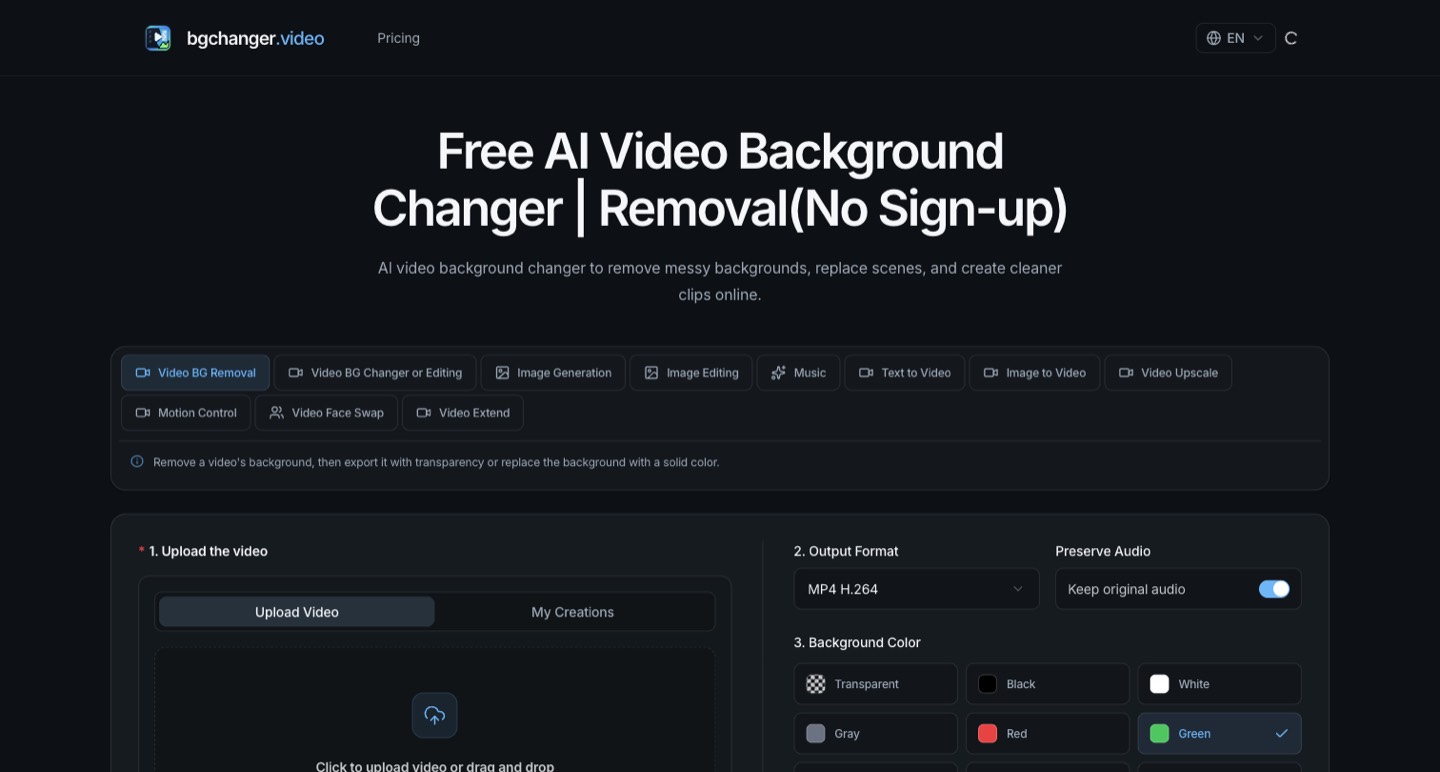
bgchanger.video offers browser-based video background removal and replacement, including a documented transparent WebM option and solid-color outputs. Its public monthly plans can be inspected, but the exact cost of a particular removal job, successful free export and watermark behavior were not verified in this research. No footage was uploaded or paid generation run.
A background-removal job can look simple until the cutout reaches the editor. Fine hair flickers, a hand disappears for a frame or a supposedly transparent file opens against a solid background. For a creator preparing a product clip or talking-head overlay, the useful result is a subject that remains usable in the final composition.
bgchanger.video offers browser-based video background removal and replacement, including a documented transparent WebM option and solid-color outputs. Its public monthly plans can be inspected, but the exact cost of a particular removal job, successful free export and watermark behavior were not verified in this research. No footage was uploaded or paid generation run. [1] [2]
Decide whether you need a cutout or a finished background
A transparent subject is useful when you intend to composite it later over a slide, a product scene or another video. A solid-color replacement can be the final visual treatment. A generated new scene introduces another set of decisions about lighting, perspective and what the viewer may believe happened.
The reviewed interface exposes background-removal output choices, background colors and an option to preserve the original audio. Its public workflow describes transparent WebM output. Select the documented option that matches your downstream editor and verify the exported file inside the actual project. [1]
Prepare a short source sample containing the difficult moments: movement, fingers near the face, fine edges and a section where the subject resembles the background. A still frame can conceal errors that become distracting when the clip moves.
Read monthly prices from the monthly controls
We opened the pricing page in a browser and selected Monthly on all three plan cards. That matters because the default presentation included annualized prices, annual credit issuance and promotional badges alongside monthly-looking amounts. [2]
| Plan selected as Monthly | Published price | Credits per month |
|---|---|---|
| Lite | $9.99 | 120 |
| Basic | $19.99 | 250 |
| Plus | $29.99 | 450 |
These figures are the live public interface, not a checkout receipt or a guarantee of a fixed number of videos. We did not establish a universal credits-per-second rule for the selected background-removal workflow. Without that debit, a credit allowance cannot responsibly become a promise of ten or fifty usable exports.
For a production budget, record the intended source duration, output setting and actual debit shown before confirming a job. Include another attempt for a difficult section and any additional export versions you need. Keep a small test separate from a full batch of client clips.
Annual badges need a closer look
The annual view we observed contained inconsistent arithmetic. One card listed 3,000 base credits plus 600 bonus credits alongside a +30% badge. Six hundred is 20% of 3,000. Other savings labels also appeared in that presentation. We therefore do not present the annual badges as verified savings or an exclusive deal. [2]
Before buying an annual plan, ask for the total charge, the period covered, the number of credits actually issued, when they refresh and what happens on cancellation. Save the confirmed purchase details. A normalized monthly equivalent is useful for comparison, but the amount charged today and the timing of the allowance determine whether it suits your work.
One-time credit packs are a separate offer on the same page. Do not assume their expiry and refund treatment match a subscription. The reviewed refund policy treats one-time purchases and subscription payments differently. [5]
The free headline does not settle the workflow
The homepage title advertises free background removal without sign-up, while the interface also includes a sign-in-to-try-free control. The terms say some features require an account. Those public statements do not establish that a particular anonymous visitor can complete the exact export they need. [1] [4]
If free access is important, confirm the whole route before preparing a batch: upload, processing, usable resolution, download and any watermark. A preview that can be inspected but not delivered is a different outcome from a successful free production export. We have not tested that route and do not label it as verified.
Free and paid uploads have different training treatment
The privacy policy explicitly distinguishes paid and free content. It says private paid-user content is not used to train the vendor's models or general-purpose AI systems, while free-user prompts, uploads, outputs and related data may be used to improve or train its services unless a feature states otherwise. [3]
That difference should affect the sample you choose. Public footage you own is a more appropriate first evaluation than an unpublished client interview, a child in a private setting or a recording supplied under a confidentiality restriction. A free allowance can have a meaningful data-handling trade-off.
The policy also describes server-side storage and general retention criteria rather than a precise deletion clock for every uploaded clip. Establish the actual retention and deletion controls for your workflow before using sensitive production media. We have not audited the provider's implementation or negotiated a client-specific arrangement.
A cutout review that catches useful errors
View the output over both a light and a dark background. Scrub through fast movement and inspect the start and end of the shot. Then play the sequence at normal speed, because a technically small edge error can become visually dominant when repeated across frames.
Check the subject's outline around glasses, hair, motion blur and objects held in the hand. Listen to the audio around any edit you plan to make afterward. Preserve the original source so a difficult segment can be replaced without reconstructing the entire job.
Finally, place the output into the real composition. Confirm scale, color and the apparent direction of the light. A clean isolation can still feel wrong against a new scene if the subject's perspective or illumination does not fit.
Read the refund boundary before using paid capacity
The reviewed policy says subscription refund eligibility is narrowly limited to a same-calendar-day request before using benefits, with a possible 70% refund under its conditions. It describes one-time purchases as non-refundable, subject to applicable mandatory rights. This is a summary of the vendor's policy, not a prediction about an individual dispute. [5]
Resolve a material compatibility or pricing question before consuming credits. A small paid test can be sensible when you understand what you are buying; it should not be based on the assumption that an unused-looking result automatically qualifies for a full refund.
Place background work in the larger edit
bgchanger.video is most useful to evaluate on a short, rights-cleared sample with a known destination. Judge the moving edges, verify the actual output and measure the debit. Keep the free-processing policy and unresolved annual pricing presentation visible in the buying decision.
How we assessed this tool
Official public product, pricing, documentation and policy research with AI-assisted original editorial analysis. No installation, paid output benchmark or performance rating.
Questions & answers
Can I definitely export a video anonymously for free?
We did not verify that complete workflow. The homepage headline advertises no sign-up, while the interface includes a sign-in-to-try-free control and the terms require an account for some features. Confirm the exact export path and allowance.
Can bgchanger.video make a transparent video?
Its public workflow documents a transparent WebM option. We did not run a render. Select the appropriate format and inspect a short exported sample in your downstream editor before preparing a production batch.
Are free uploads covered by the same training policy as paid uploads?
No. The reviewed privacy policy says private paid-user content is not used for its model training, while free-user prompts, uploads, outputs and related data may be used to improve or train services unless a feature states otherwise.
Sources & check dates
- 1. Official workflow and output choices ↗ · Checked 2026-10-27
- 2. Pricing, monthly controls verified in browser ↗ · Checked 2026-10-27
- 3. Free versus paid content-training policy ↗ · Checked 2026-10-27
- 4. Account and content terms ↗ · Checked 2026-10-27
- 5. Subscription and one-time purchase refund policy ↗ · Checked 2026-10-27
Related reading & tools
toolbgchanger.video
Remove or replace video backgrounds for cutouts and creator compositions.
Read more ↗ article
Woven Video Review: Mac Editing, Pricing and AI Credits
Woven Video combines chat edits with a Mac timeline. Understand the $39 monthly plan, card-required trial and separate AI credit allowance.
Read more ↗ article
Shortify.now Review: Turn Long Videos into Shorts
Compare Shortify.now's clip and AI-video workflows, monthly credits, free watermarks, export limits and local versus cloud privacy boundaries.
Read more ↗