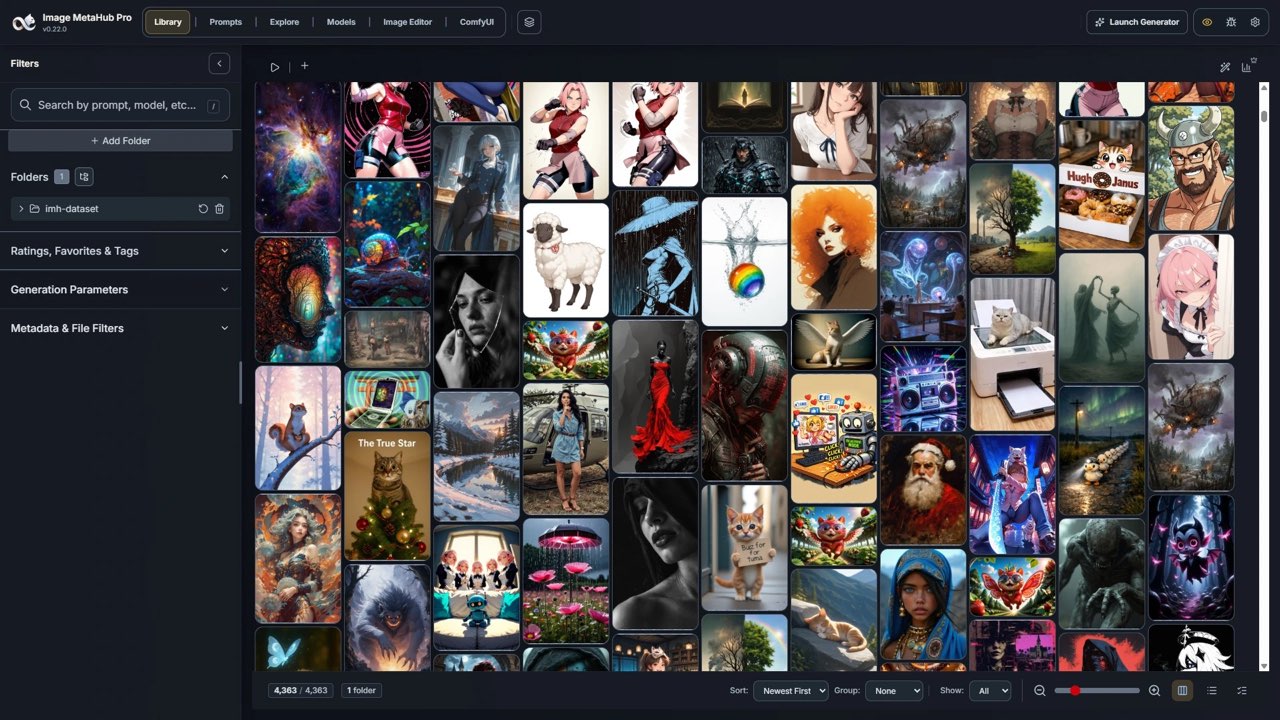
Image MetaHub is a local AI media manager. It helps browse and search existing generative media, inspect available generation details and organize a library without making a cloud gallery mandatory. Its appeal is strongest for creators who repeatedly produce image variations and need to preserve the connection between a result and the process that made it.
The difficult part of generating hundreds of images is often finding the one you want to make again. A thumbnail folder may contain several promising versions, but the useful prompt, checkpoint or reference has been lost between filenames and browser downloads. Image MetaHub addresses that organizational problem.
Image MetaHub is a local AI media manager. It helps browse and search existing generative media, inspect available generation details and organize a library without making a cloud gallery mandatory. Its appeal is strongest for creators who repeatedly produce image variations and need to preserve the connection between a result and the process that made it. [1]
Start with the library you already have
Imagine a creator making a recurring educational series. Every episode has several background candidates, alternate thumbnails and rejected compositions. Months later, the creator wants the same visual treatment for a new topic. A folder of final JPEGs may show the appearance but fail to explain the decisions behind it.
A useful media library should answer three questions: where is the source file, what information is available about its generation, and why did you keep it? The last question is your contribution. A rating, a short note or a collection named for a real project often provides more practical value than a large unreviewed pile of images.
Begin with a representative working folder rather than your entire archive. Include a raw generated image, an edited export and an asset with missing generation information. These examples expose whether the application understands the files you actually use.
What metadata can—and cannot—tell you
The maintainer documents support for generation metadata from tools including ComfyUI, Automatic1111 and compatible exports from several other generators. The repository also shows prompt inspection, filtering and media-management workflows. Compatibility depends on the information the file contains; a recognizable picture is not necessarily a picture with an intact generation record. [3]
Export pipelines can separate an image from its history. A screenshot, flattened edit or social download may no longer contain the original settings. An organizer cannot be expected to recover an exact seed, model version or workflow that was never preserved in the file or a usable sidecar.
Even complete metadata does not establish reproducibility on its own. You may still need the same model files, relevant versions and source references. A prompt is one part of a production record. For valuable work, retain the original output and supporting materials as well as the final graphic.
It also helps to distinguish generation details from permission evidence. A model name embedded in a PNG does not establish that every reference image, likeness or included mark was cleared for a commercial project. Keep those project decisions in an appropriate record outside the image browser.
The free version has a substantial job to do
The official comparison includes local indexing, metadata search, tags, ratings, favorites, watched folders and a prompt library in Free. Pro adds model-management tools, generation integrations, advanced comparison and analytics. Local visual-search indexing is listed for the newest 2,000 images in Free versus the full library in Pro. [2]
That makes a useful evaluation possible before paying. If your main problem is finding a prompt and grouping work by project, start with that workflow. A Pro feature is valuable when it solves a recurring bottleneck; a more detailed feature list does not automatically improve a small library.
For an evaluation folder, try locating all the images belonging to one episode, finding an asset with a known prompt phrase and adding a note explaining why a particular version was selected. Then move away from the application and see whether the underlying project files still make sense.
Image MetaHub Pro pricing
The official Pro page displayed US$4.99 monthly, US$19.99 annually and US$39 for a lifetime license. It says the paid options unlock the same Pro features, with monthly and annual subscriptions renewing until canceled. Its advertised refund window is 14 days; verify the actual purchase terms before relying on that promise. [2]
| Option | Price shown | How to evaluate it |
|---|---|---|
| Free | US$0 | First establish whether the local organization workflow helps. |
| Monthly Pro | US$4.99/month | A smaller initial commitment for evaluating the extra tools. |
| Annual Pro | US$19.99/year | Compare the yearly payment with expected ongoing use. |
| Lifetime Pro | US$39 once | Read the license scope and support assumptions before buying. |
A lifetime license is a purchase structure. It does not remove the need to retain your files or establish how future compatibility, development and support will work. We would choose between these options after a successful library test, rather than purchase lifetime access merely because it is displayed beside a recurring plan.
Local-first still leaves choices about connections
The product describes local indexing and an optional local visual-search index. It also offers integrations with generation services and model resources. The practical boundary is the action you enable: browsing a local file and requesting work from a connected service are different data flows. We have not audited the application's network behavior. [1] [3]
Keep optional connections out of the first evaluation. Confirm that you can browse, search and organize the test folder in the configuration you intend to use. Add generation or resource integrations individually, with a clear understanding of the destination and credentials involved.
Local storage also needs a backup plan. A laptop failure can remove the image, the library's notes and the information needed to rebuild the workspace at the same time. Keep the original media and the application's relevant data in a recoverable arrangement. A search index makes files easier to find; it is not a replacement for another recoverable copy.
Why “source-available” is the careful license label
The repository's current license is PolyForm Perimeter 1.0.1. We therefore describe the project as source-available rather than assuming that a public repository grants unrestricted open-source reuse. The license text should be reviewed if you plan to modify, redistribute or build a competing product from the software. [4]
That distinction is usually separate from an individual creator's daily organization task. It becomes important if a studio wants to package the application, incorporate its code into another service or offer a derivative product. Keep the software license, the paid feature entitlement and rights in your own media as separate questions.
Who will get the most value?
Image MetaHub is a promising fit for creators who generate many visual iterations and repeatedly lose the connection between an image and its working context. Someone producing an occasional standalone graphic may already be served by a disciplined folder and project naming system.
The most useful first result would be modest: finding an approved image quickly, understanding the available generation details and keeping your selection notes with the project. If that works reliably, the advanced comparison and model-management features can be assessed against a real need. Our Recraft and SurgePix guides address the creation stage that comes before this organization problem.
For image generation and editing workflows, read our SurgePix guide. ↗
For generating and refining creator artwork, read our Recraft guide. ↗
How we assessed this tool
Official product, documentation and policy research; no account-based or paid-output benchmark.
Questions & answers
Can Image MetaHub recover generation settings from any image?
Do not assume it can. The useful information depends on what the file or related records preserve. A flattened export may lack the original generation details.
Should I buy Pro before organizing my first folder?
Start by testing the free organization workflow on representative files. Evaluate Pro when a specific additional function solves a recurring problem.
Is an image browser also a backup?
No. Keep recoverable copies of your original media and relevant application data. Easier searching does not protect against losing the device or storage.
Sources & check dates
- 1. Image MetaHub official product and local-media workflow ↗ · Checked 2026-10-26
- 2. Image MetaHub Free vs Pro and pricing ↗ · Checked 2026-10-26
- 3. Maintainer repository and supported metadata ↗ · Checked 2026-10-26
- 4. Current PolyForm Perimeter license ↗ · Checked 2026-10-26
Related reading & tools
 article
Recraft Review for Creators Building a Recognizable Visual Style
See where Recraft fits in a creator design workflow, from vector assets to style controls, and understand its free-plan privacy and ownership limits.
Read more ↗ article
SurgePix Review: Editable Layers, Brand Kits and Plan Limits
SurgePix combines AI visuals with layer editing. Explore text changes, brand kits and export checks, with pricing and commercial rights still to verify.
Read more ↗