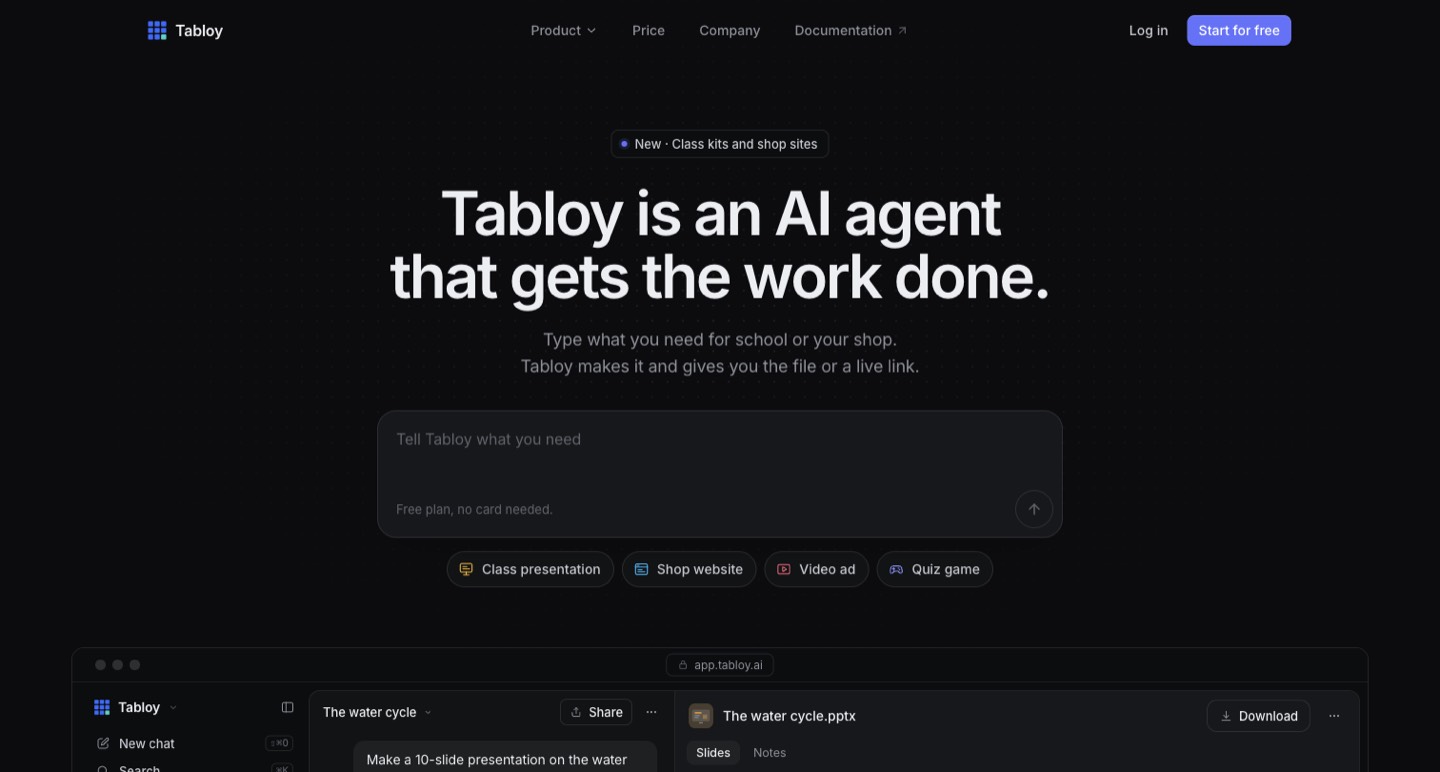
Tabloy AI is a general agent for producing files, websites and other working outputs from a chat. For creators, its most practical evaluation is a small, connected launch brief. Its current public pricing uses five-hour and weekly AI limits, so the number of requested assets is not a guaranteed number of completed builds. We researched public pages and directly rechecked the live pricing and privacy pages in the browser.
A creator launching a workshop rarely needs just one asset. The same idea must become a useful presentation, a clear registration page and a short promotional message. Generating each piece separately can produce three slightly different versions of the offer, especially when the date or audience changes midway through the project.
Tabloy AI is a general agent for producing files, websites and other working outputs from a chat. For creators, its most practical evaluation is a small, connected launch brief. Its current public pricing uses five-hour and weekly AI limits, so the number of requested assets is not a guaranteed number of completed builds. We researched public pages and directly rechecked the live pricing and privacy pages in the browser. [1] [2]
Give the launch one source of truth
Begin with a compact offer brief: who the workshop serves, what a participant should be able to do afterward, the date, the price and the action to take. Add the evidence for any factual claim. Mark details that are undecided instead of allowing the agent to complete them with plausible guesses.
For example, an illustrator could ask for a short introduction deck and a simple information page for a session on preparing sticker artwork. The intended output is a consistent explanation, not a larger campaign assembled from invented testimonials or attendance numbers.
Ask for one deliverable first. Review its terminology and promises, then reuse the approved brief for the next asset. This makes corrections deliberate. A wrong session date repeated across six attractive outputs is still a substantial publishing problem.
Files and live links require different checks
The official product shows editable presentation files, documents, small websites and other outputs; its documentation describes obtaining real files rather than only chat text. An editable deck is useful when you need to change a diagram or speaker note after generation. A published page has an additional audience and data-handling boundary. [1] [5]
For a deck, inspect every slide in the application you intend to present from. Check line breaks, factual labels, image relevance and whether the quiz or exercise matches the lesson. For a website, follow every button, test the form and inspect the mobile reading experience. Treat an agent's completion message as a cue to review the result.
If the page collects registrations, decide where those submissions go and what the visitor is told. The terms and privacy policy place responsibility on the person publishing a site and explain that published links can be opened by anyone who has the address. [3] [4]
Understand the current usage system
The live price page reviewed on 27 October 2026 lists Trial, Basic, Pro and Pro+. Every plan has a five-hour and a weekly AI limit. Requests consume a share according to their size; the page describes the paid tiers as multiples of Trial. [2]
| Plan | Published monthly price | AI-limit multiple |
|---|---|---|
| Trial | $0 | Baseline |
| Basic | $5 per user | 2× Trial |
| Pro | $10 per user | 4× Trial |
| Pro+ | $20 per user | 8× Trial |
The same page distinguishes storage, simultaneous published sites, always-on apps and organization capacity. Do not translate an AI-limit multiple into an entitlement to twice as many finished campaigns. Large revisions, generation and different tasks can consume different amounts of usage. [2]
During research, indexed pricing material still showed an older monthly-request system. Our baseline comes from the live browser page, not the stale snippet. We have not verified a logged-in checkout, and a previous promotion with an October 25 deadline is not presented as an active offer.
Budget the review rounds, not just the first request
A proposed workshop evaluation could have four stages: create a six-slide draft, revise the exercises, build an information page and correct the mobile layout. Note the usage meter after each accepted stage. The useful result is a picture of what your real review process costs in allowance.
Keep a change log. A short instruction such as “change the session date in the approved files and page” is easier to evaluate than a complete rebuild with a new creative direction. Group related corrections when appropriate, but keep an individual request clear enough that you can tell whether it succeeded.
Leave time between generation and publication for a person to read the complete result. A usage limit resetting later in the week does not help if your event page must be corrected immediately. Preserve editable files and important published information outside the agent account as well.
The desktop app has two processing paths
Tabloy advertises a Windows and Mac desktop beta. Its current privacy policy says local chats and files can remain on the computer, while cloud AI tasks send the content they need to a model provider. That can include file text, data rows or pages opened for a task. Choosing a downloaded local model is a separate path. [3]
The offline documentation describes downloading a model and supporting components, and explains that some connected functions remain unavailable without the internet. It also warns that local models can be slower or less capable. We did not install the beta or compare model performance. [6]
For client work, classify the input before choosing a mode. Public workshop copy, a private customer spreadsheet and an unpublished sponsor agreement should not automatically follow the same processing route. Give an agent only the folder and data needed for the bounded task, and examine any requested file or database changes.
Research quality still needs an editorial owner
A source-linked answer helps you investigate a claim, but the presence of a link does not establish that the claim follows from it. Open the cited material and check the precise date, plan and wording. Keep those checks in the approved brief so a later slide or promotional paragraph does not revive an outdated statement.
Who should shortlist Tabloy?
Tabloy deserves a bounded evaluation when several launch assets need to stay connected and you want editable files or a small working page. Start with a non-sensitive brief, inspect the real output and observe the usage meter across revisions. That will reveal more than an impressive demonstration of an unrelated app.
Creators with strict processing restrictions or a complicated production website should first establish whether the chosen mode and delivery meet those requirements. The current price can make experimentation accessible; the final decision should rest on a reviewed output, a workable usage budget and clear ownership of what gets published.
How we assessed this tool
Official public product, pricing, documentation and policy research with AI-assisted original editorial analysis. No installation, paid output benchmark or performance rating.
Questions & answers
Are Tabloy's paid AI requests unlimited?
The live pricing page reviewed uses five-hour and weekly AI limits on every plan, with larger allowances on paid tiers. Requests consume allowance according to size. Older indexed monthly-request language is not our current baseline.
Does the Tabloy desktop app keep every AI task offline?
No. The current privacy policy says task-needed content can be sent to AI providers when cloud models are used. A downloaded local model is a separate processing path, and connected web or publishing functions still need internet access.
Can a creator edit the presentation files Tabloy makes?
The official product and documentation describe editable slide and document files. Inspect the actual file in your presentation application, review the facts and layout, and preserve an approved copy before using it with an audience.
Sources & check dates
- 1. Official product and output examples ↗ · Checked 2026-10-27
- 2. Current pricing, directly rechecked in browser ↗ · Checked 2026-10-27
- 3. Current privacy policy, directly rechecked in browser ↗ · Checked 2026-10-27
- 4. Current terms and rolling usage rules ↗ · Checked 2026-10-27
- 5. Editable document workflow ↗ · Checked 2026-10-27
- 6. Desktop local-model offline workflow ↗ · Checked 2026-10-27
Related reading & tools
toolTabloy AI
Create editable decks, small launch websites and other assets from a brief.
Read more ↗ article
Kuse Review: Turn Scattered Research into a Creator Brief
Use Kuse to organize source files and draft creator briefs. Understand credit billing, document permissions, privacy and source-checking limits.
Read more ↗ article
Ankon AI Review: Turn PDFs into Whiteboard Explainer Videos
A source-based Ankon AI review covering PDF explainers, monthly versus annual pricing, credit costs, factual checks and upload privacy.
Read more ↗