For offline script dictation, download a local speech model, keep cloud post-processing disabled, and dictate into your writing app. Handy supports this approach, but local transcription, optional AI cleanup and stored recording history need separate checks.
The useful question for a creator is not simply whether a dictation app works offline. It is whether the whole route from microphone to finished draft fits the material being recorded. A locally transcribed first draft can still be sent to a cloud model for cleanup, saved in local history, or pasted into a cloud document. Treat those as separate decisions rather than assuming one privacy label describes everything.
Handy's FAQ says speech recognition happens on the device and that enabling a cloud post-processing provider sends transcription text to that provider. Its privacy policy also describes local recordings and transcript history, including a configurable retention limit. Those details make it possible to design a deliberate workflow, but they are not proof that a particular installation has been configured correctly. This guide proposes a short evaluation; we did not install or benchmark the application for this article.
Read the Handy product review for installation, model and platform context. ↗
Build a script outline before opening the microphone
Dictation is easier to edit when you know what each section must accomplish. For a proposed two-minute tutorial, write four short prompts first: the problem, the change to make, an example, and the limitation. Speak one section at a time. A rambling ten-minute recording creates a larger editing problem even if every word is recognized accurately.
For example, a creator explaining a camera setting might dictate the problem and the demonstration separately. Keep the exact setting name in a written reference beside the outline. After each section, compare the transcript with that reference. Names, numbers, units and negations deserve a deliberate check because a fluent sentence can conceal a consequential substitution. This is an editing checklist, not a measured Handy error rate.
Download the intended model while connected, confirm that the model has finished loading, and then try the same small passage without a network connection. Leave cloud cleanup off for this test. Check that the result reaches the intended text field rather than a different window or a stale clipboard target. Repeat the passage in the actual writing application you intend to use. A successful transcription inside a settings window does not establish successful insertion into your editor.
The model choice also matters. Handy's FAQ distinguishes Parakeet's primarily English behavior from other model options for non-English speech. For bilingual scripts, evaluate an actual mixed-language passage with your proper nouns and natural speaking style. Do not choose a model solely because a directory lists a large language count. Recognition support, code switching and the format of the output are different questions.
Separate recognition, cleanup and retention
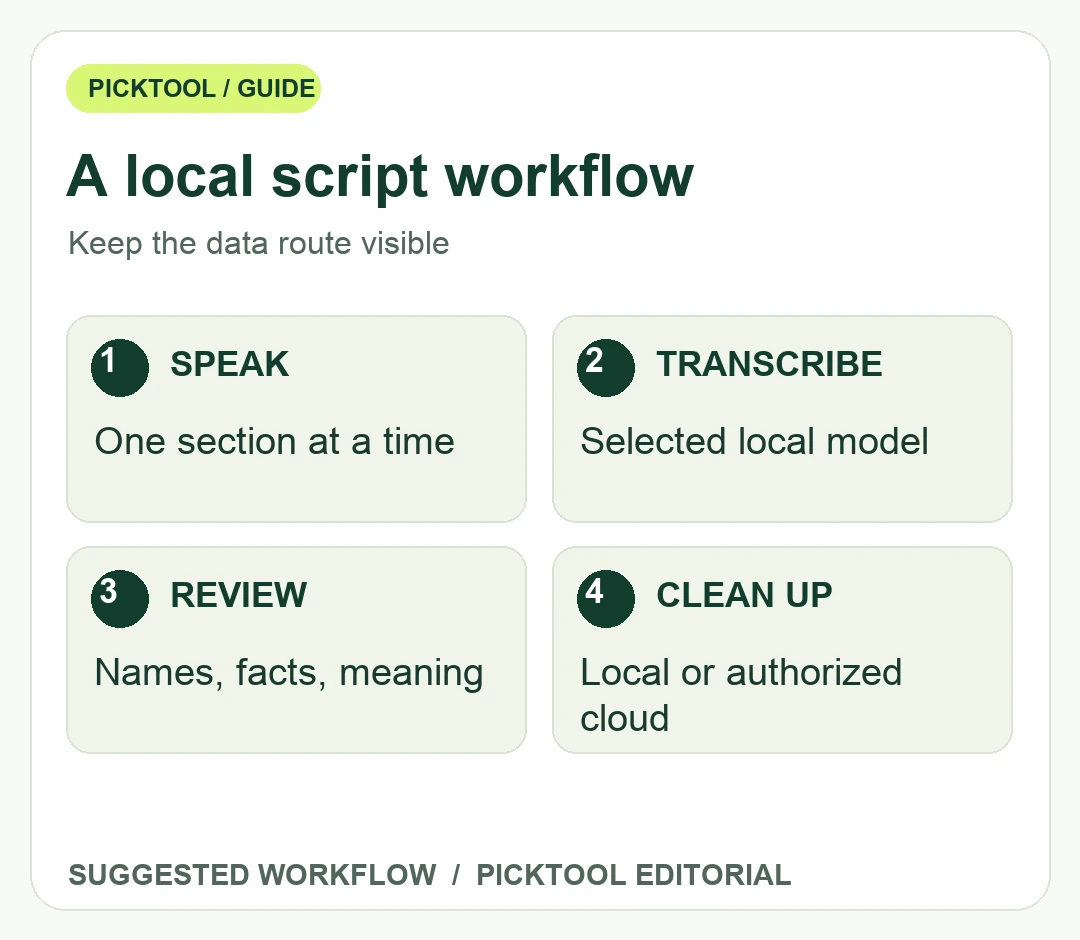
Use three checkpoints for every proposed setup. Recognition asks where microphone audio is processed. Cleanup asks whether the recognized words go to another model. Retention asks what remains after the result has been pasted. A fourth practical checkpoint is the destination document: local recognition does not make a shared online document local.
For an unreleased script, a sensible evaluation starts with a harmless sample. Confirm your selected model, inspect the post-processing settings, and review the local history controls before using confidential client material. Handy's policy says history can be restricted and individual entries deleted. Decide whether retaining audio is useful for checking misheard words or unnecessary for your project. Saved entries and ordinary recent history may have different lifetimes, so inspect both.
If you want AI rewriting later, make that a separate editorial pass. First retain a plain transcript as the reference. Then request a limited transformation, such as shorter sentences without adding claims. Compare the revised draft with the reference before replacing it. Cloud cleanup can be a useful choice when authorized, but it changes the data route and may involve separately billed provider access. A paid consumer chatbot subscription does not establish that a provider API is connected or included.
Compare DraftKey when your task includes local writing assistance beyond dictation. ↗
Judge the finished draft, not a words-per-minute claim
Create a small acceptance sheet with five rows: correct facts, correct names, usable punctuation, correct insertion, and time spent editing. Run the same passage twice under the same microphone and model conditions. Record the application version and settings with the result. This gives you a personal comparison you can repeat after an update; it does not produce a universal accuracy score.
Include at least one awkward sentence in the sample, such as a correction made mid-thought, a numbered instruction, and a phrase containing a product name. Handy's FAQ notes that spoken punctuation commands are not natively interpreted by the speech models in the way some users expect. If you need literal punctuation commands, verify your chosen cleanup approach instead of building a recording session around an assumption.
For a voiceover, read the edited draft aloud before recording. A transcript that looks polished can still contain long clauses, repeated setup, or words you would not naturally say. For a research interview, preserve the speaker's meaning rather than silently replacing it with marketing language. Dictation speeds capture; the creator still controls what the final script claims.
Choose offline dictation when you benefit from speaking a rough draft and can support the local model on your machine. Choose another workflow when you need collaborative live transcription, a particular language model, or editing features the installed tool does not provide. The decision should follow your sample and permissions, not an unverified promise that every offline app is equally fast, accurate or private.
See Loqui's separate limits and processing questions before comparing dictation options. ↗
Questions & answers
Does offline transcription mean no text ever leaves the device?
No. Optional cloud cleanup and the destination writing app can transmit text separately. Check recognition, cleanup, storage and destination as separate stages.
Sources & check dates
- 1. Handy FAQ: local transcription, language models and cleanup ↗ · Checked 2026-10-28
- 2. Handy privacy: local history and optional providers ↗ · Checked 2026-10-28
- 3. Handy maintainer repository and installation guidance ↗ · Checked 2026-10-28