Use AI social scheduling to prepare drafts, then review the account, wording, media, time and destination before confirming publication. PublishBuddy documents confirmation cards for scheduling and publishing; required team approvals are a separate plan feature.
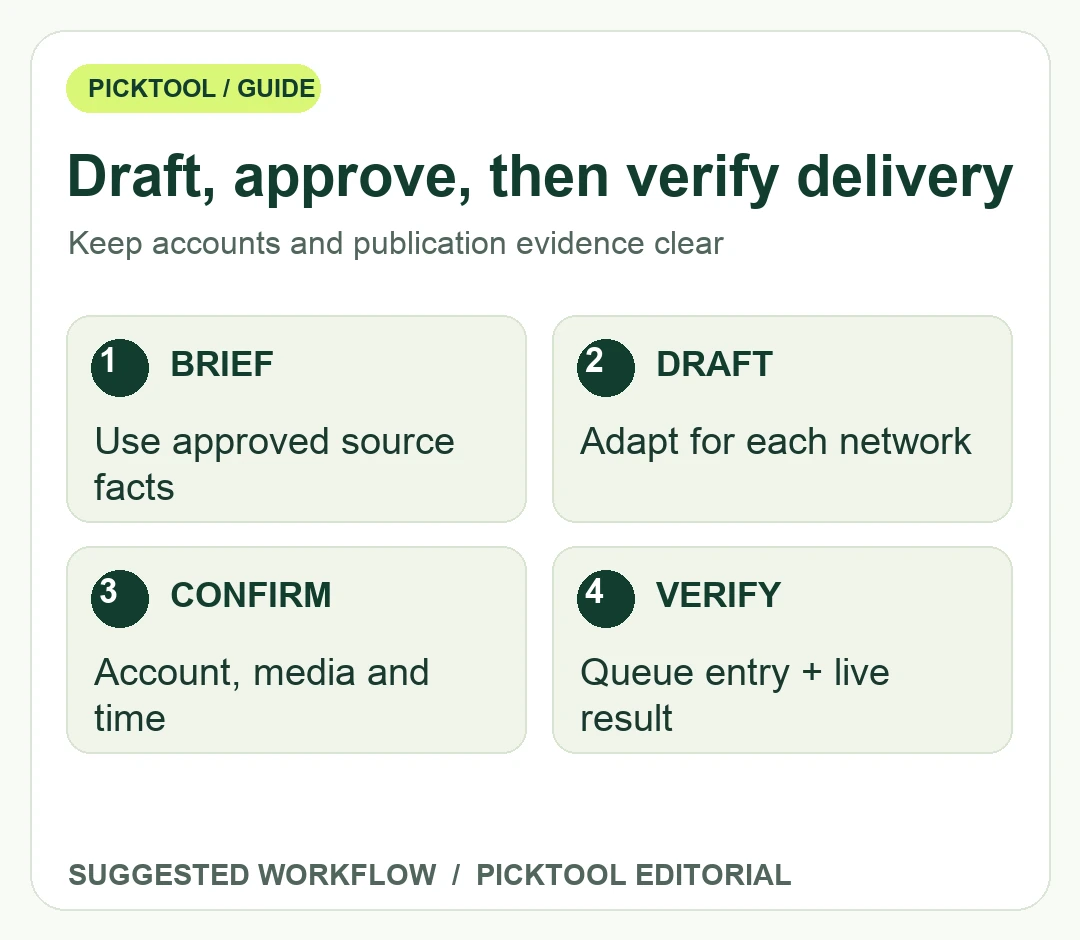
The valuable part of an AI social agent is not simply writing several captions quickly. It is helping a team turn approved source material into suitable drafts without losing control of accounts, claims and publication timing. Treat draft preparation, editorial approval and delivery to a social network as separate stages with separate evidence.
PublishBuddy's current agent page says it can work from workspace information, write drafts and prepare scheduling actions. It describes confirmation cards before scheduling, queueing, publishing and other consequential changes. Its pricing page separately lists required approvals for chosen team members on Business. This guide explains a proposed controlled workflow; it does not claim that Picktool connected social accounts or published a post through the agent.
Read the PublishBuddy profile for product scope, supported workflows and official sources. ↗
Give the agent an approved source and a narrow brief
Choose one live article, release note or product announcement that has already passed a factual review. Specify the audience, network, purpose and action the reader should take. For a proposed tutorial promotion, the brief might request a concise LinkedIn explanation and a shorter post for another network, each linking to the same approved guide. It should not ask the agent to invent a discount, testimonial or performance claim to make the post more exciting.
Prepare a source checklist before generating captions. Include the exact product name, what changed, which users can access it, any important limitation and the canonical destination URL. If the source makes a conditional statement, retain that condition in the draft. A shorter post must still be accurate. AI-generated reasoning about why a past post performed well should be treated as an interpretation to examine, not proof of causality.
Select the intended account explicitly. An agency or creator may manage a personal profile, a brand page and several client accounts. A correct caption posted to the wrong destination is still a failed workflow. Confirm account names in the current interface rather than relying on the account selected during a previous session or a remembered preference from another project.
Review the action card as a publication decision
PublishBuddy says drafts can be saved without a publication confirmation, while scheduling and publishing wait for a Confirm action. Use that boundary deliberately. Review the actual wording, selected account, attached image or video, destination link and scheduled time on the action card. Where the preview does not answer a material question, inspect it in the composer before approving.
Check time zones and dates in ordinary human terms. A launch intended for a particular local morning should be verified against the time zone displayed by the scheduler. Avoid relative instructions such as tomorrow morning when several reviewers work in different regions. Record the exact intended date, time and zone with the campaign brief so a later reschedule can be checked against the same reference.
Personal confirmation and required team approval solve different problems. A confirmation card asks the current operator to approve an action. A team-approval policy can require another authorized person in the workflow. The current pricing page distinguishes those capabilities, so do not assume the agent's confirmation feature automatically creates a separate reviewer requirement for every team member.
Keep credit use and delivery evidence visible
The current pricing page lists AI-credit allowances on paid plans, and the agent page says image-generation cards show the selected model and cost. Check that cost before generating optional artwork. A social post that only needs an existing approved image should not incur a new generation charge because the instruction was vague. Keep image creation and post publication as distinct approvals.
After scheduling, inspect the actual queue entry. After the planned time, verify the result on the social network or use a clear delivery receipt from the platform. A saved draft is not scheduled, and a scheduled post is not yet a confirmed public post. If a job fails or a receipt is uncertain, investigate before retrying so the same message is not published twice.
Use a small campaign record containing the source URL, network, account, approved wording, media version, intended time and actual result. If you add tracking parameters, keep the destination useful and avoid including private information in the address. Use consistent campaign naming so analytics can be interpreted later. Tracking does not establish that a particular wording caused a sale or a ranking change.
Build a consistent campaign URL with Picktool's UTM Link Builder when tracking is appropriate. ↗
Review results after an appropriate amount of real exposure, comparing like-for-like posts where possible. Impressions, clicks and conversions answer different questions. Do not turn a single early result into a universal content rule. The agent can help retrieve and summarize account information; the team remains responsible for the interpretation and the next publication decision.
Choose this workflow when the draft and approval controls fit your publishing needs. If you require a review process the selected plan does not support, resolve that before connecting a high-impact account or promising a client an approval gate. Good automation makes the next action clear and reviewable; it should not make responsibility for a public message ambiguous.
Explore Tabloy AI when you need a wider set of launch assets beyond the social scheduling step. ↗
Sources & check dates
- 1. PublishBuddy official agent scope and confirmation controls ↗ · Checked 2026-10-28
- 2. PublishBuddy current AI credits and team-approval plans ↗ · Checked 2026-10-28
- 3. PublishBuddy official supported publishing workflows ↗ · Checked 2026-10-28