Riverside records high-quality tracks on each participant's device and uploads them for later editing. Keep guests connected until uploads finish, choose the appropriate raw or aligned files, and verify every track before treating the session as safely delivered.
A remote interview is not ready for editing simply because the call ended successfully. The useful files may still be uploading from participants' devices. The producer needs a clear finish procedure, a complete set of tracks and a handoff that tells an editor how the files line up. Plan those steps before inviting a guest, especially when the interview cannot easily be repeated.
Riverside's help center describes high-quality tracks as locally recorded on each participant's device and uploaded during or after the session. That separates the quality of those recordings from the live call's network stream, but it does not remove the need to complete an upload. This guide is a proposed recording checklist, not a report that we recorded a session or recovered an interrupted upload.
Read the Riverside review for the broader recording and plan context. ↗
Prepare the guest for the end of the session
Include the finish procedure in the invitation, not only in a rushed closing message. Tell the guest to keep the relevant recording page or application open until the upload status confirms completion. Explain whom to contact if something appears stuck. Use the current Riverside help instructions for the participant's device and application rather than relying on a remembered workflow from another platform.
Before the real conversation, make a short authorized sample with the actual microphones, headphones and devices. Listen to the separate tracks, check whether the expected video is present and confirm that both participants understand the upload indicator. This tests your own setup. It should not be presented as evidence that every device, browser or internet connection will behave the same way.
For a proposed two-person interview, create an asset checklist in advance: host audio, guest audio, required video, screen share if used, and any reference recording. Assign one person to verify that list. A transcript, recording preview or combined edit may be useful, but it should not silently substitute for a missing high-quality track if the production brief requires separate originals.
Choose raw and aligned files deliberately
Riverside's documentation distinguishes raw tracks from aligned versions that add padding to place a participant at the correct point in the session timeline. It also notes that tracks created with mobile and macOS applications have limitations around alignment padding. Confirm which files your actual session produces before telling an editor that every track will start at an identical time reference.
Ask the editor what they need before downloading a large folder. A raw file can be appropriate when they will synchronize manually or work from another reference. An aligned version can simplify a compatible timeline workflow. Avoid mixing differently prepared variants without labeling them. Name the participant, recording date, media type and variant so that a filename helps explain the file rather than merely numbering it.
The help center describes raw WAV audio separately from enhanced Magic Audio versions. Keep an untouched original when testing enhancement. Compare the processed track for missing syllables, altered room sound and changes to the guest's voice. Enhancement is an editorial option, not a substitute for checking microphone placement and the original recording.
For synchronized video, inspect the beginning, a middle moment and the end after import into the destination editor. Look for progressive drift and unexpected gaps. If the conversation includes a visual demonstration, check the moment a person points to or changes something on screen. A timeline that starts correctly can still contain a problem later in the session.
Verify the upload and make an editor-ready handoff
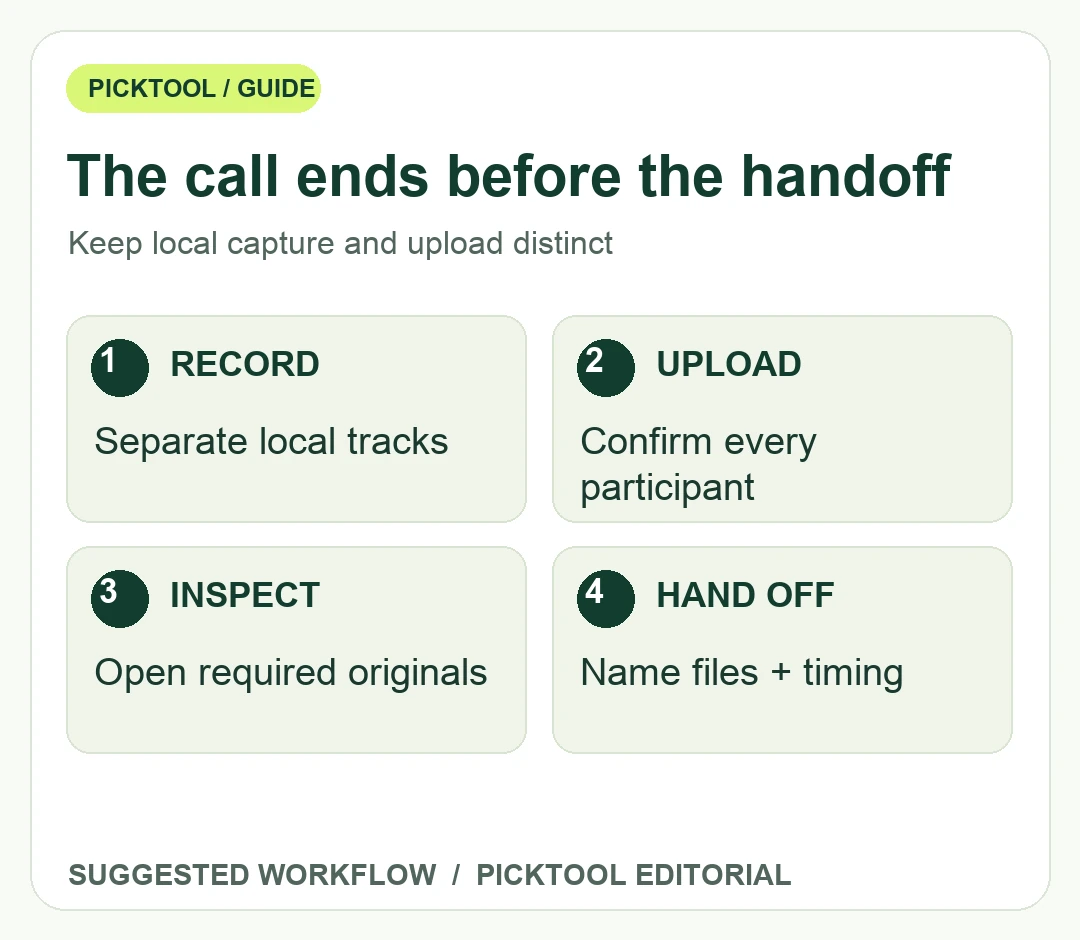
At the end of recording, read the actual upload status for each participant. If a track is incomplete, follow the current device-specific completion instructions before clearing local browser data or asking the guest to start over. Keep the explanation calm and specific. The recording's local nature is useful only if the required media can still be retrieved and uploaded.
After downloading, open every required file and compare its duration with the planned session. Check for silence, a wrong input device, a missing channel, truncated endings and unexpected video dimensions. Record problems in a handoff note instead of expecting the editor to discover them during assembly. A successful download button is not the same as a complete media review.
Deliver one clearly named folder of approved originals and a separate folder for optional processed versions. Include the session timing reference, any intentional pauses, selected takes and the expected output. Preserve a backup before editing so a mistaken trim does not replace the only original. Confirm the storage location and access with the team rather than distributing private interview material through an uncontrolled public link.
Once the tracks are secure, move on to editing and clipping. Keeping capture, upload verification and editorial assembly as distinct checkpoints makes it easier to identify what actually went wrong when a session has a problem. The aim is a recoverable interview and a clear handoff, not simply a call that appeared to go smoothly.
Sources & check dates
- 1. Riverside definition of local high-quality and aligned tracks ↗ · Checked 2026-10-28
- 2. Riverside local-track upload completion instructions ↗ · Checked 2026-10-28
- 3. Riverside current recording plans ↗ · Checked 2026-10-28