Use the dictionary to help Flow handle names and terms; use a snippet to expand a deliberate spoken trigger into reusable text. Test ordinary speech and the intended phrase separately, and check personal versus shared rules before adding a workaround.
A name that is repeatedly misspelled and a paragraph you dictate every day are different problems. Treating both as a generic replacement can create surprising text. Wispr Flow has dictionary and snippet features, so first decide whether you want a word recognized correctly or a short phrase expanded into a longer message.
Dictionary and snippets serve different jobs
The current dictionary help describes adding names, terms and corrections, including an explicit misspelling-to-correct-spelling entry. It says matching uses whole words without case sensitivity and that longer phrases take priority. These are useful constraints when designing a correction; they are not a reason to add broad everyday words indiscriminately. [1]
The current snippets guide describes a spoken trigger and an expansion. On desktop, the documented path is Snippets, Add new, then save the trigger and expanded text. The help page currently lists personal snippets across plans. Account and organizational controls can still affect what you see. [2]
| Need | Better starting point | Example |
|---|---|---|
| A fictional product name is misspelled | Dictionary term or explicit correction | Lumora should keep its approved spelling |
| A repeatable client follow-up is long | A distinctive snippet trigger | “insert client followup” expands a draft |
| A variable amount or date changes each time | Dictate and review the variable content | Do not hard-code an old invoice date |
| A team needs consistent terminology | Review shared rules and ownership | Agree on one approved term first |
Build a small terminology list first
Start with the words that cause real editing work. A useful list includes the approved spelling, a short sentence showing the intended meaning and the observed error. You do not need a large dictionary merely because an import option exists.
For the fictional brand Lumora, write an example such as “Send the Lumora brief to the design team.” Dictate the whole sentence, inspect the result and note whether the problem is recognition, capitalization or a substitution made later by the destination app. If only one application changes the spelling after insertion, a Flow dictionary entry may not be the relevant fix.
Add the narrowest rule that solves the observed problem. Then test the correct form, the troublesome spoken form and a nearby ordinary phrase that should remain unchanged. A correction that improves one brand name but alters common client language is too broad for a shared rollout.
Create a snippet people will not trigger accidentally
Use a memorable phrase that is unlikely to appear in normal conversation. “Insert client followup” is clearer than a common word such as “thanks.” The former signals an intentional expansion; the latter could appear at the end of many unrelated messages.
A fictional expansion might read: “Thanks for the update. I will review the brief and send the next steps after checking the open questions.” Keep it as a draft until the sender verifies the recipient, commitments and timing. A snippet should not silently promise a deadline or insert an obsolete price.
Avoid storing passwords, API keys or private account data in reusable text. Where a message needs client-specific details, use clearly visible placeholders and review them before sending. If placeholders would be easy to overlook, keep the snippet shorter and dictate the variable section separately.
Test capture, expansion and insertion separately
First test in a plain note field. Say the trigger by itself, inspect the expansion and repeat it in a sentence. Then test in the actual application where it will be used. If Flow captures the phrase correctly in the note but the target field behaves differently, investigate the field or insertion path instead of repeatedly rewriting the trigger.
Keep a small test record: trigger, expected expansion, actual output and destination. Include one sentence that uses similar words without intending an expansion. This negative check helps reveal collisions before a team adopts the shortcut.
For a shared snippet, have a second person review the wording for unintended promises. A saved paragraph can spread an outdated policy faster than a spelling error. Assign an owner and a review date if the text contains operational instructions.
Review personal and shared rules
Flow's current documentation distinguishes personal entries from entries shared with a team. [3] Before adding a duplicate correction, check which scope already owns the term and whether your organization controls dictionary access. Ask the administrator to resolve policy or visibility issues rather than trying to bypass them with another account.
The current dictionary and bulk-import help describe using Import from the relevant feature page. Check the current instructions and your installed controls before importing a large list; an old screenshot or search snippet may describe a different setup. Review the file preview, destination and duplicate handling before accepting an import. [1][4]
For an initial rollout, a handful of reviewed entries is easier to audit than a large import. Keep the original terminology sheet outside the tool so you can compare a future change. If a rule causes unexpected replacements, disable or revise the narrow rule and repeat the same test cases.
A simple maintenance routine
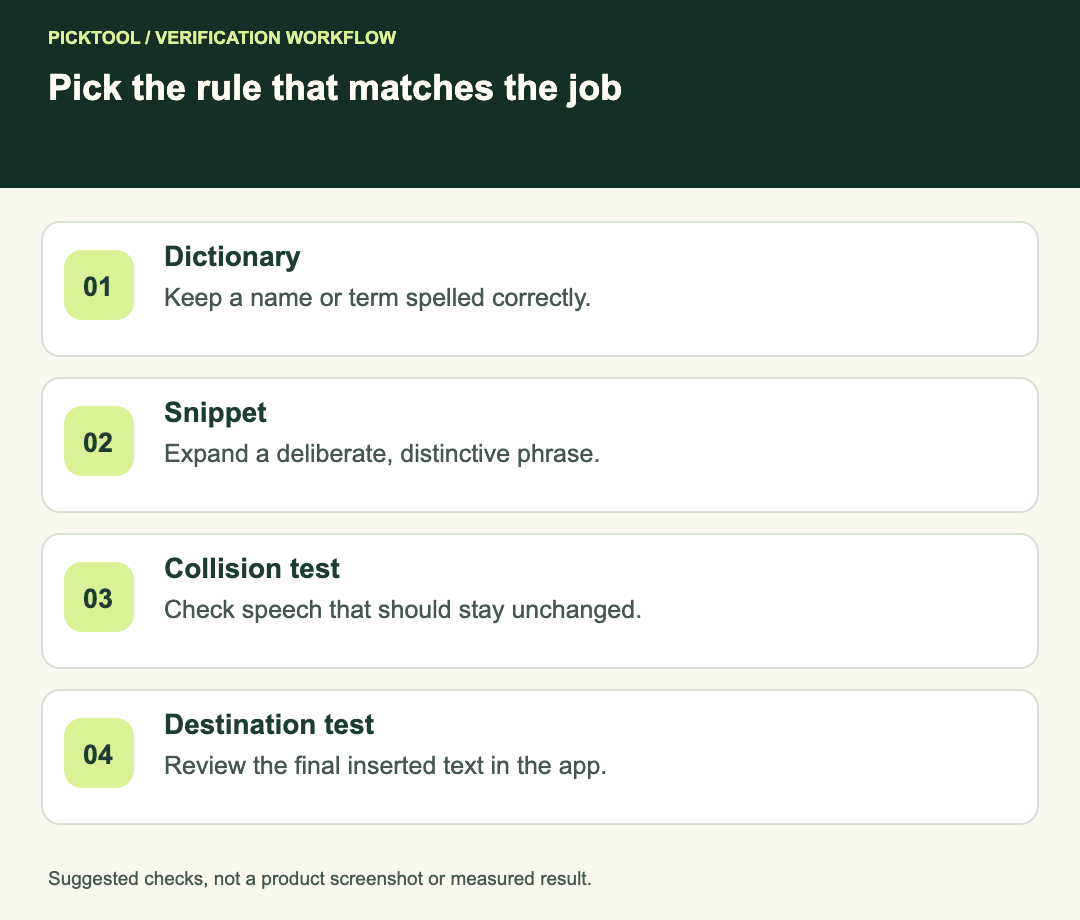
- Dictionary: keep approved spelling, observed error and an example sentence.
- Snippets: keep a distinctive trigger, owner and reviewed expansion.
- Test ordinary speech that should not activate the rule.
- Check both a plain note and the real destination field.
- Review shared rules before creating personal duplicates.
- Recheck entries that contain changing commitments or product terminology.
Diagnose capture or insertion problems on Windows before changing terminology ↗
Read the broader Wispr Flow review ↗
The examples and rollout checklist are editorial suggestions. We did not install Flow, import a dictionary or run a recognition-accuracy test for this guide.
How we assessed this tool
Official-source research and a review of the first 10 organic Google results for the recorded query. Workflows, diagrams and fictional examples are editorial guidance. No installed-product, paid-generation or output-quality benchmark was performed.
Questions & answers
Should a brand name be a snippet?
Usually start with the dictionary when the goal is correct recognition or spelling. Use a snippet when you deliberately want a trigger expanded into longer text.
Why does an old import tutorial show different controls?
Feature instructions can change. Check the current feature help and installed interface; older screenshots or indexed snippets can describe an earlier setup.
Can I put changing prices in a shared snippet?
Only with a clear owner and review process. A safer draft leaves variable commitments for a person to verify before sending.
Sources & check dates
- 1. Wispr Flow: teach Flow your words with the dictionary ↗ · Checked 2026-10-29
- 2. Wispr Flow: create and use snippets ↗ · Checked 2026-10-29
- 3. Wispr Flow: personal and shared dictionary entries ↗ · Checked 2026-10-29
- 4. Wispr Flow: current bulk import instructions ↗ · Checked 2026-10-29