What does Spritix do?
Spritix generates short animations from a character reference and exports sprite sheets, GIFs, atlas JSON and PNG frames. It is aimed at indie game creators building reusable character actions. The main constraint is the combined credit and download budget: the free plan advertises 20 monthly credits and downloads from two generations per month, while animation quality and character preparation consume credits.
A character that looks appealing in one frame is only the beginning of a game asset. The harder question is whether the same character remains recognizable while moving, returns cleanly to its first frame and fits the animation system you already use. Spritix is relevant to that smaller, repeatable workflow. It is worth evaluating as an animation starting point, with a deliberate inspection step between generation and a playable scene.
Start with a character reference you can inspect and reuse
The provider describes two starting routes: upload a reference image or create a character from text. A preparation step standardizes the reference into a reusable reference. You then choose an action and animation quality, and may work in one direction or eight directions. Its eight-direction FAQ describes five direction references with the other three mirrored; it is not a promise of eight independently generated views. The advertised action vocabulary includes Idle, Walk, Run, Jump and Attack. These controls give you a concrete brief, but do not prove that every generated frame will preserve proportions or that every action will suit your game.
For an initial evaluation, keep the reference uncomplicated: a readable silhouette, a limited palette and a distinctive feature that should remain visible during motion. This is a suggested test setup, not a result we produced. Ask one narrow question first, such as whether a walk cycle retains the character’s boots and face. Changing the reference, quality, action and direction at once makes it difficult to identify which choice improved or weakened an output.
Treat the character library as a way to organize iterations, rather than an assurance of consistent performance. Keep your accepted reference and a short written description outside the service too. When you revisit an action, compare it with the same reference and the same acceptance criteria. The AI proposes the motion; you remain responsible for deciding whether the character and timing still communicate the intended action.
Budget the whole action set, including preparation and downloads
The public pricing separates character preparation from animation runs. Preparation costs one credit. The currently available Low and Mid action qualities cost five and twenty credits. The free account has twenty credits refreshed monthly and download access for two generations per month. Monthly Starter is $12 for 500 credits, Pro is $29 for 1,500 and Max is $69 for 4,500. A separate $5 pack supplies 100 credits; the larger listed packs require a Pro or Max subscription. Those are the provider’s published terms at the check date, not a promise that a particular number of usable assets will result.
Consider this illustrative budget: one new character and one run for each of five single-direction actions would use 1 + (5 × 5) = 26 credits at Low quality, or 1 + (5 × 20) = 101 at Mid quality. The twenty-credit free allowance therefore does not cover that complete five-action example, even before any reruns. A cheaper first experiment is one prepared character and a single Low action, which would use six credits under the published schedule. These are arithmetic examples, not generation tests.
Downloads introduce a second decision. Having credits remaining does not remove the free plan’s two-generation download allowance. The plan comparison describes download access for two generations monthly, while the homepage says the four export files rebuild from the same applied settings. Distinguish a generation unlock from the files it produces, and confirm the remaining allowance in the interface. The free plan also has limited Mirror, Smooth and Perfect Loop uses; larger frame counts and export sizes belong to paid plans. Buying extra generation credits should not be confused with upgrading those plan features.
A credit-pack headline is a theoretical generation budget, not an asset-quality guarantee. Leave room for repeated attempts, especially if several directions must agree with one another. Starter credits are valid for thirty days, while Pro and Max monthly credits are valid for sixty; listed purchased credit packs do not expire. The refund policy allows a manual review request within fourteen days. Only an approved unused paid-credit proportion is eligible, with nonreturned processing fees potentially deducted. Used credits and unused subscription time are not refunded. Cancelling renewal and receiving a refund are separate processes.
Review the exported loop, its dimensions and the rights to the source
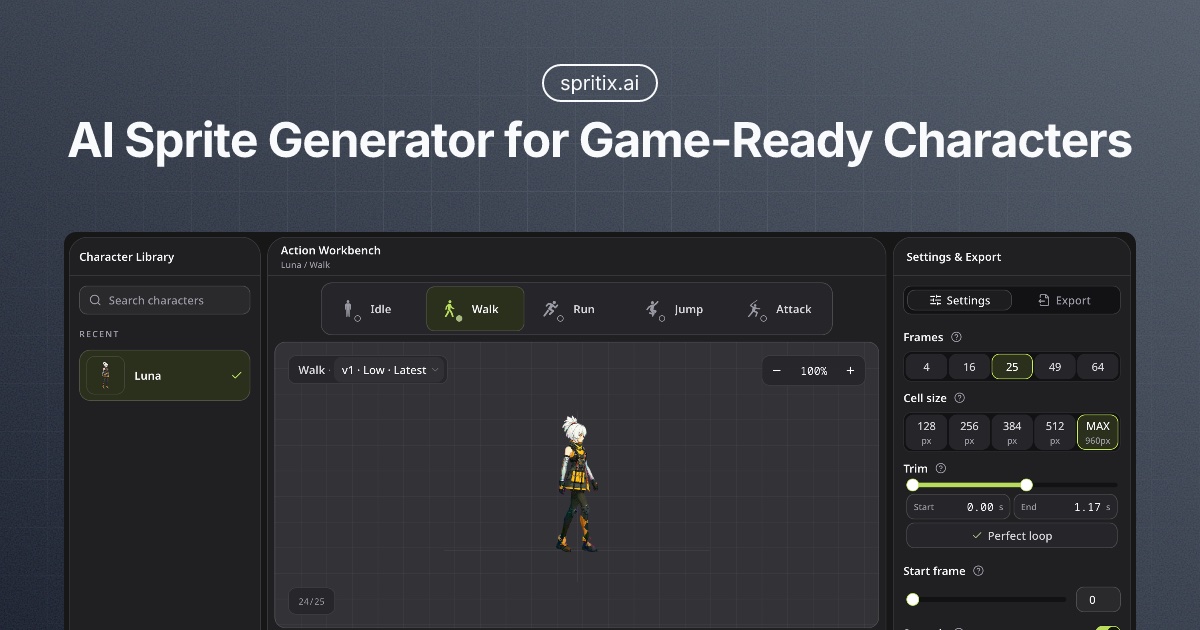
Spritix advertises sprite-sheet PNG, animated GIF, atlas JSON and individual PNG frames in a ZIP, alongside controls for frame count, cell size, trimming and the start frame. The homepage says loop edits run in your browser without spending generation credits, although features such as Perfect Loop have plan-specific limits. Those are useful handoff choices because a game needs predictable frame geometry and timing. We did not download an animation or import a package into Unity, Godot or Phaser, so the export path should be treated as a workflow to verify in your own project, rather than a compatibility benchmark.
A practical review would check the first and last frame together, watch for a jump when the animation repeats and compare the character’s size across the sequence. Inspect the sheet grid or atlas JSON against your importer’s expected dimensions and frame timing. Then check the pivot and playback settings in your engine. An animation can look acceptable in a browser preview while still needing frame selection, assembly or timing work before it behaves properly in a scene.
The terms say you retain rights in submitted content and the provider does not claim ownership of exported generated files. They also warn that outputs may not be unique and can involve third-party rights. None of that supplies permission to upload somebody else’s protected character or an asset whose licence forbids this use. Start with original or appropriately licensed material and retain its licence record. The privacy page says cloud and AI-generation providers may process Studio jobs under their own terms. It does not name every such provider or specify a fixed uploaded-asset retention period or a general downstream training exclusion. Do not treat a private account as proof of local-only processing.
Spritix is most useful to evaluate when you already know which character action your project needs and can judge the resulting frames. Start with one reference, one action and an explicit export check. A portfolio image alone is insufficient evidence that a complete action set will be consistent, affordable or ready to import. This profile is based on official-source research, with the untested generation and integration steps left visible.
Task-specific workflow guides
Import an AI Sprite Sheet into Godot: Frames, Timing and Loops ↗
AI Sprite Sheets in Unity: Slice, Order and Test the Frames ↗
What you can do with it
- Character-reference preparation and reusable character library
- Idle, Walk, Run, Jump and Attack actions
- Single-direction or 8-direction animation workflows
- Frame selection, trimming, cell sizing and start-frame controls
- Sprite-sheet PNG, GIF, atlas JSON and PNG-frame ZIP export
Features are based on the stated evidence level. Confirm current availability and plan limits with the official provider.
Understand the pricing first.
This is a plan description, not a guaranteed numeric price. Check allowances, renewal terms, and exports before paying.
What to check before choosing
No generated animation or game-engine import was tested. New generation attempts consume credits. Browser-based loop edits do not use generation credits, but plan features and download limits still apply. The public pages do not establish every downstream AI-processing or asset-retention detail. The provider’s non-ownership statement does not supply rights to an uploaded third-party character.
Evidence and research limits
Official homepage, pricing, terms, privacy and refund pages checked on 29 October 2026. No signup, paid generation, output-quality benchmark or Unity/Godot/Phaser import was performed. The cover is the provider’s official social-preview artwork, retrieved from https://spritix.ai/og.png, not a Picktool-generated output. Discovered through the TAAFT new feed; directory placement is not independent proof of the original launch date.
Does it fit better than your other option?
Sources & check dates
- 1. Official character, action and export workflow ↑ · Checked 2026-10-29
- 2. Official free plan, packs and per-operation credit costs ↗ · Checked 2026-10-29
- 3. Official content-use and service terms ↗ · Checked 2026-10-29
- 4. Official privacy and service-provider disclosure ↗ · Checked 2026-10-29
- 5. Official refund conditions ↗ · Checked 2026-10-29
- 6. Cover image credit: official Spritix social-preview artwork ↗ · Checked 2026-10-29