What does Hashtag Cleaner do?
Picktool Hashtag Cleaner turns a hashtag list into one deduplicated, space-separated list for creators preparing social posts. It keeps the first spelling and processes input in your browser. Paste tags only: ordinary caption words also become tags, and cleanup does not predict reach.
What the cleaner changes, and what it keeps
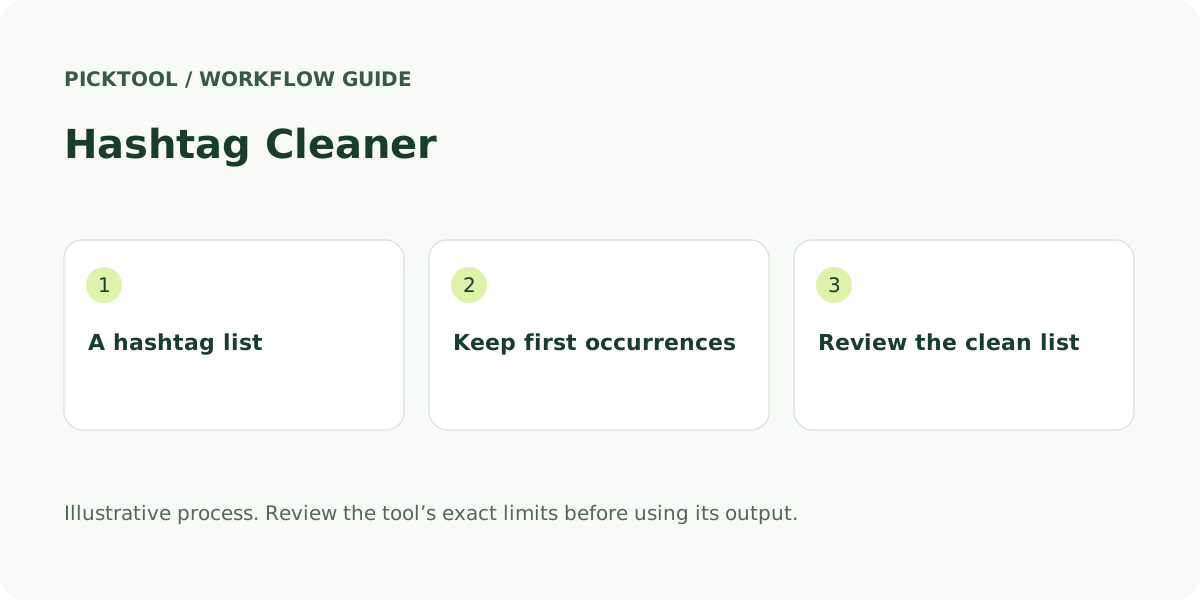
A useful hashtag cleaner should make a small editorial task predictable. Picktool splits your list at spaces, commas and semicolons, removes leading hash signs, keeps Unicode letters, numbers and underscores, then adds one # to each remaining term. Matching ignores letter case and keeps the first spelling in the first position. It does not sort the list, fetch a social account or ask an AI model to choose topics.
That behavior matters when you combine a campaign list with a reusable topic list. #CreatorTools and #creatortools become one entry. A later duplicate does not overwrite the earlier capitalisation. The resulting list is easy to copy into a publishing draft or download as plain text. Keep your original approved list separately if you need a record of what changed.
This is list mode, not caption-preserving mode. If you paste “Watch our new video #Editing”, the ordinary words become #Watch #our #new #video too. Separate the hashtag block before cleanup. Some competing tools preserve surrounding caption text or extract only terms already prefixed with #; those are different jobs, and the choice changes the output.
Work through an illustrative combined-list example
Illustrative input: #CreatorTools, #AI; #creatortools #Video_Editing #AI. The output is #CreatorTools #AI #Video_Editing. Five input terms become three unique tags, with the original ordering and the first spelling retained. This is a mechanical example, not a claim that those tags are suitable for your audience.
Punctuation needs a deliberate check. Because punctuation inside a term is removed, #video-editing becomes #videoediting and #hello.world becomes #helloworld. A slash is also removed, not interpreted as a separator. If you intended two separate topics, split them with spaces or commas before running the tool. Do not treat the result as a platform’s own parser.
Unicode letters are accepted, but marks that are separate Unicode combining characters are not retained by this implementation. Two visually similar spellings may therefore behave differently, especially in scripts or accented text using decomposed characters. Review every multilingual tag in the destination app. The cleaner does not transliterate languages or resolve visually similar letters.
Check relevance, destination rules and privacy before posting
After cleanup, read each tag as a reader would. Does it describe the actual post, and would a person following that topic find the content useful? YouTube’s official hashtag guidance prohibits spaces within a hashtag and warns against unrelated terms and excessive tagging. Removing duplicates does not make an unrelated or prohibited term acceptable. Consult the destination platform’s current rules rather than carrying a limit from a different network.
The cleanup itself does not upload your list, save its text in tool history or contact a platform. Copy and download happen only when you request them. The website still makes ordinary page requests, and its wider account and consent behavior is described in the privacy policy. Avoid confusing browser-local transformation with a promise that every part of a website or your clipboard is private.
For the final check, paste the result into your actual draft, verify that the intended terms are clickable as expected, then read the full caption for clarity. Use the caption counter for a separate text-length check. Neither tool certifies approval, discovers trending hashtags or guarantees indexing, recommendations or engagement.
Choose a list cleaner or a richer hashtag workflow
The reviewed search results cover several distinct intents. Macroviewpoint offers caption-preserving duplicate removal. Comment Picker combines hashtag totals, unique counts and duplicate removal. RapidToolset exposes case-sensitivity and sorting controls. CodeShack focuses on extraction with formatting and export options. Their public interfaces describe more controls than this deliberately narrow list cleaner; no comparative output accuracy or speed test was performed.
Use Picktool when you want a simple first-occurrence list without sending it to an AI service. Choose extraction or caption-preserving software when the tags are mixed through paragraphs. A generator is a separate decision again: suggested tags still need relevance and policy review. The practical advantage of a clean list is a more controllable draft, not an evidence-free claim about better reach.
What you can do with it
- Case-insensitive duplicate removal
- First spelling and order retained
- Unicode letters, numbers and underscores
- Copy and plain-text download
Features are based on the stated evidence level. Confirm current availability and plan limits with the official provider.
Understand the pricing first.
This installed browser utility is free to use.
What to check before choosing
List mode only: ordinary words become hashtags. Internal punctuation and combining marks are removed. Does not validate platform syntax, recommend tags or predict reach.
Evidence and research limits
Research reviewed the first ten organic Google results for this tool’s main query plus the primary sources listed below on 30 October 2026. Search used English/US parameters in a signed-in browser, so positions are a dated observation with location and personalization limits. Competitor interfaces and public copy were inspected; no competitor performance benchmark is claimed. Picktool behavior was checked against its implementation. Illustrative examples are labelled. No paid AI generation was run for this guide.
Sources & check dates
- 1. YouTube Help: hashtag use and policies ↗ · Checked 2026-10-30
- 2. MDN: Unicode character class escapes ↗ · Checked 2026-10-30
- 3. Macroviewpoint duplicate hashtag remover ↗ · Checked 2026-10-30
- 4. Comment Picker hashtag counter ↗ · Checked 2026-10-30
- 5. RapidToolset hashtag duplicate remover ↗ · Checked 2026-10-30
- 6. CodeShack hashtag extractor ↗ · Checked 2026-10-30